

Can GA4 Exclude Bot (Spam) Traffic or Visits from Overseas? Practical Methods Explained
*(The original article in Japanese was written by Hanae Tsuchiya, the Customer Success Consultant of Ayudante’s GMP team. This article was translated by Masaki Kuroshima.)
Many GA4 users often ask questions like:
- “Can I exclude traffic coming from overseas?”
- “Is it possible to manually filter out bot or spam traffic?”
In this article, we’ll walk through the built-in bot filtering feature in GA4 and explain how to identify and exclude bot-like or unwanted traffic—such as visits from specific countries—directly within your reports.
GA4’s Built-in Bot Traffic Filtering
GA4 automatically filters known bot traffic by default.
Events generated by bots listed in Google’s research and the IAB (Interactive Advertising Bureau) International Spiders & Bots List are excluded from reporting.
Important:
- This bot filtering cannot be turned off.
- You cannot manually add custom bots to the exclusion list.
Even with this built-in feature, it can be difficult to completely remove bot activity because bot behavior evolves daily.
Additionally, GA4 does not provide any admin-level feature to block or exclude traffic from specific countries or regions at the data collection stage.
If you want cleaner data for analysis, you’ll need to identify bot-like traffic yourself and exclude it within your reports.
How to Identify Bot Traffic in GA4
Bot traffic often shows noticeable patterns. Some common signs include:
• Sudden spikes from unexpected countries or regions
For example, large volumes of sessions or pageviews from countries that your site does not typically serve.
• Unknown or outdated browser versions
Cases where:
- the browser user-agent can’t be detected, or
- the version is unusually old
• Sessions with zero engagement
Traffic from specific regions or browsers where:
- no engagement events occur
- engagement rate is extremely low
You can detect these patterns by using Explorations and combining relevant dimensions and metrics.
Example: Bot-like traffic identified in an Exploration
▽Traffic from a specific country landing on a single page repeatedly, with no engagement events
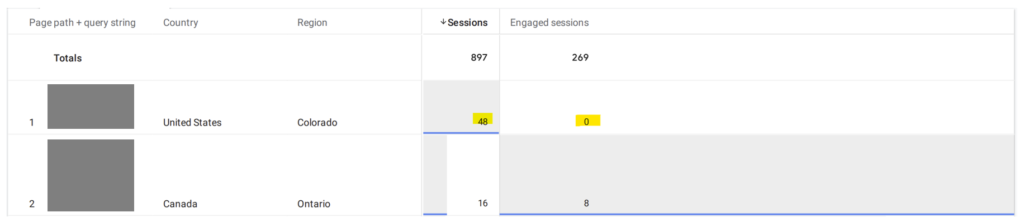
▽Traffic from extremely old versions of Chrome with zero or very low engagement

These types of anomalies strongly suggest automated traffic.
How to Exclude Specific Traffic in GA4 Reports
While GA4 cannot block this traffic at the collection level, you can exclude it within Explorations using filters.
Steps to Exclude Specific Countries, Browsers, or Other Dimensions in Explorations
- Open the Exploration report
- Go to Settings → Filters
- Select the dimension you want to exclude (e.g., Country, Browser Version)
- Choose “does not match regex” or another exclusion condition
- Enter the value(s) you want to exclude
- Click Apply
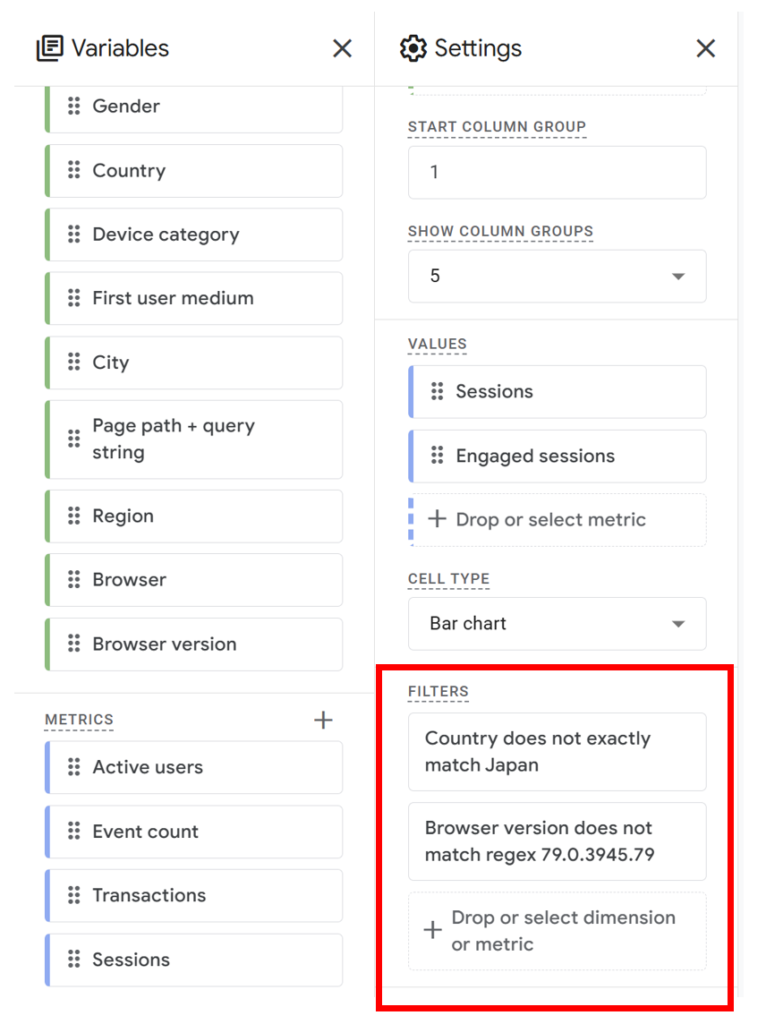
This allows you to create a cleaner, bot-free view of your traffic for analysis or reporting.