

Upcoming Changes to Google Analytics Data Controls: What GA4 Users Need to Know
*Information current as of April 14, 2026. Please refer to Google’s official communications and help documentation for the latest updates.
(The original article in Japanese was written by Kasumi Yoshinari, the Senior Customer Success Consultant of Ayudante’s GMP team. This article was translated by Masaki Kuroshima.)
GA4 users have recently received an email from Google with the subject: “Upcoming changes to Google Analytics data controls.” This column explains what that email means and what actions, if any, you need to take.
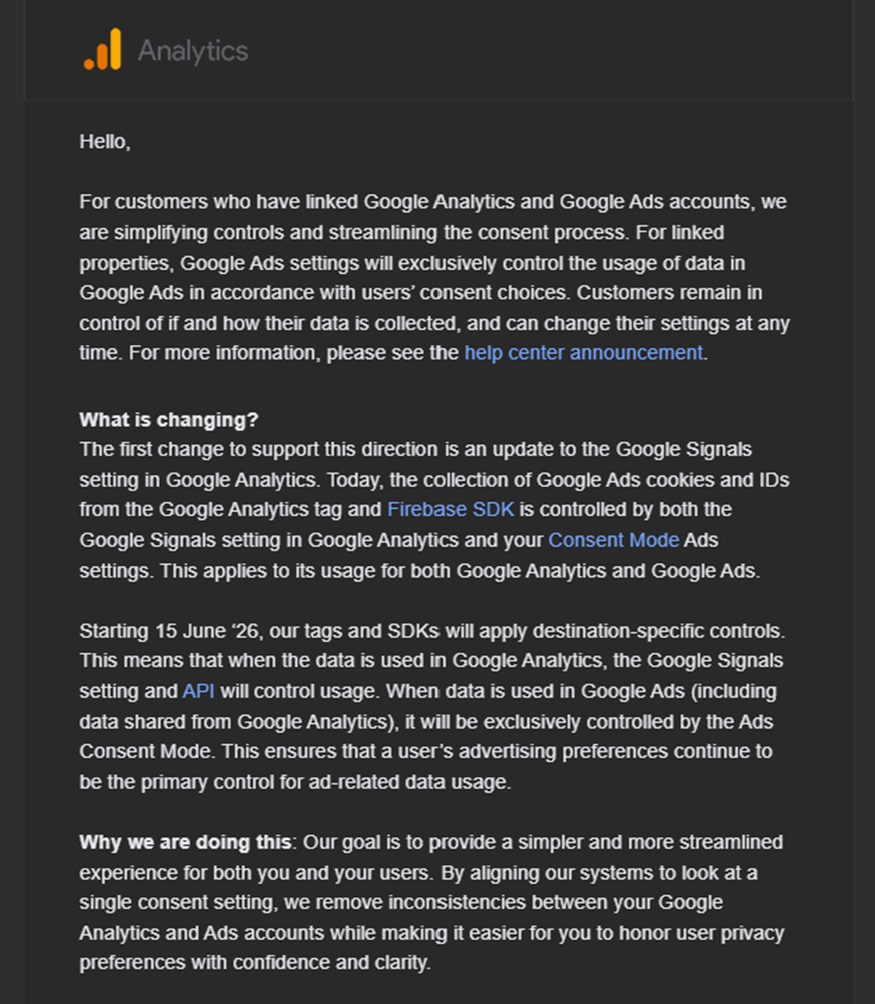
If you have not linked your GA4 property to Google Ads, the changes described in this column do not affect you. If you have no applicable properties, you may not have received the email — in which case, you can also disregard this article.
Summary
| • A specification change will take effect on June 15, 2026. • If your GA4 property is linked to Google Ads and Google Signals is currently turned OFF, action may be required. • If completing the required changes before June is difficult, you can request an extension via the form linked in Google’s email. |
This upcoming change does not affect what data is collected or measured by GA4 / Firebase (GA4F). Rather, it relates to how you control whether data collected via GA4/Firebase is shared with and used by Google Ads. As a result, it may have an impact on how Google Ads campaigns are operated when GA4 is linked to Google Ads.
Official GA4 Help (English): Updates to Google Analytics Data Controls
https://support.google.com/analytics/answer/17016975?hl=en&sjid=3633153940415142302-NC
Overview of the Specification Change
Background
When you link GA4 to Google Ads, data collected by GA4 is shared with Google Ads and used to improve ad delivery performance.
When a user visits your site or app, the GA4 tag or SDK collects data. This data includes advertising cookies and identifiers used for Google Ads remarketing and conversion measurement.
Of course, some users prefer that their cookies not be used for advertising. To respect these preferences, CMP (Consent Management Platform) tools and Google’s Consent Mode have been increasingly adopted — even in Japan.
Users can control whether their data may be used by providing or withholding consent through a consent signal on your site or app.
In addition to data collected via tags, GA4 and Google Ads use additional data sources. One of these is Google Signals, a service provided by Google that links information from users signed in to their Google accounts (only data they have permitted) with GA4 data.
This data powers the Age, Gender, and Interest Categories dimensions in GA4’s User Attributes report, and is also used for cross-device remarketing and other ad targeting in Google Ads.
Current Behavior (Before the Change)
Until now, control over data collection for advertising purposes (use of Google Ads cookies, advertising identifiers, etc.) has depended on two settings in GA4: the Google Signals setting in the Admin panel, and the Consent Mode (Consent State) configured via your measurement tags.
| Google Signals: ON | Google Signals: OFF | |
| Consent Mode implemented | Data used in ads according to consent state | Advertising identifiers not collected regardless of consent state, because Google Signals is disabled. Data not used in ads. |
| Consent Mode NOT implemented | Data used in ads (no consent treated as granted) | — |
While Consent Mode has become more widely adopted, not every site uses it — the necessity varies depending on the site’s content and scale. In particular, for businesses operating solely within Japan, it has been possible to restrict data use in Google Ads simply by turning off Google Signals, without implementing Consent Mode or a CMP tool.
Behavior After the Change (From June 15, 2026 Onward)
After the change, control will be determined solely by Consent Mode, regardless of whether Google Signals is ON or OFF.
| Google Signals: ON | Google Signals: OFF | |
| Consent Mode implemented | Data used in ads according to consent state | Data used in ads according to consent state |
| Consent Mode NOT implemented | Data used in ads (no consent treated as granted) | Data used in ads (no consent treated as granted) |
After the change, Google Signals will only control whether Google Signals data is linked to GA4 data for use in the User Attributes report dimensions. Control over whether collected data may be shared with and used by Google Ads will be managed entirely by the consent state sent via Consent Mode.
In summary:
- Whether Google Signals is used in GA4 reports → Controlled via the Google Signals setting in the GA4 Admin panel
- Whether collected data may be used by Google Ads → Controlled via Consent Mode at the time of measurement
If Google Signals is currently ON, behavior will remain the same as before — data usage will be controlled by the user’s consent state. The difference only applies when Google Signals is currently OFF. Let’s look at what action is needed based on your configuration.
Does My Property Require Action?
▶ If Google Signals is ON
No action is required. Data will continue to be shared with and used by Google Ads based on the consent state you have configured, just as before.
▶ If Google Signals is OFF and Consent Mode is Implemented
With Consent Mode in place, data will be shared with Google Ads if the user has granted consent, and will not be shared if the user has denied consent. In a sense, this reflects the user’s actual intent — if that approach is acceptable for your organization, no action is required.
However, if your organization’s policy is to prevent data from being shared with or used by Google Ads regardless of the user’s consent state, you will need to take the action described below.
▶ If Google Signals is OFF and Consent Mode is NOT Implemented
If you want all users’ data to be shared with and used by Google Ads without exception, no action is required. When Consent Mode is not configured, the system treats all users as having granted consent by default.
However, if you have linked GA4 to Google Ads but do not want data to be shared with or used by Google Ads, you will need to take the action described below.
Previously, turning off Google Signals was sufficient to prevent data from being used in Google Ads. After the change, however, the restriction will be enforced solely through Consent Mode — regardless of the Google Signals setting. If Consent Mode remains unimplemented, the default “no setting = granted” behavior will take effect, meaning the change will cause your data to begin being shared and used.
This also carries legal risk, so it may be a good opportunity to consider implementing Consent Mode. That said, we understand that immediate implementation is not always feasible — please refer to the action steps below.
What Actions Are Needed to Stop Data From Being Shared or Used?
| Scenario A: Using Consent Mode, but want to block Google Ads data sharing/use regardless of consent state. Scenario B: Not using Consent Mode, but want to block Google Ads data sharing/use. In both cases: Set ad_storage=’denied’ as the default consent state in your tags. |
The specific steps depend on your current Consent Mode setup and how you plan to make changes. Please consult with whoever manages your web or app measurement configuration and/or your CMP tool.
Official Help documentation:
⚠️ Important Note
Setting ad_storage=’denied’ as the default will prevent advertising cookies and device identifiers from being collected or used. This is a significant change that will directly impact your Google Ads campaigns.
It may substantially degrade performance across audience targeting, bidding, optimization, and conversion measurement.
If you are actively running Google Ads campaigns, we strongly recommend against setting a blanket default denial. Instead, the preferred approach is to implement Consent Mode properly and manage data usage based on each user’s actual consent state.
The right choice depends on your organization’s data governance policies — there is no single correct answer. Please make an informed decision with an understanding of the tradeoffs involved.
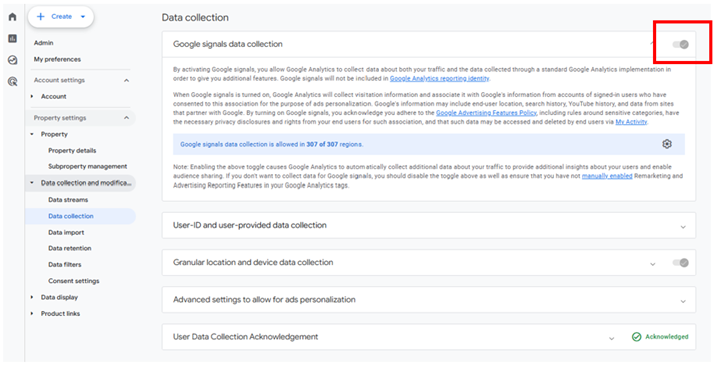
(Supplementary) How to Check Your Google Signals Setting
To check whether Google Signals is enabled for your property, go to the GA4 Admin panel and navigate to:
Property Settings > Data collection and modification > Data collection
(Supplementary) A Brief Overview of Consent Mode and Consent State
For those unfamiliar with these concepts, here is a quick overview.
“Consent Mode” is a framework that allows users to control which types of data may be collected from them. Both in Europe and increasingly in Japan, websites are expected to collect cookie data only with user consent, out of respect for user privacy.
Users don’t select permissions tool-by-tool. Instead, data collection purposes are grouped into categories — such as “advertising cookies,” “analytics cookies,” and “strictly necessary cookies” — and users can grant or deny consent for each group.
Site administrators define which tools belong to which category using a CMP tool and display a consent banner to users. Tags for GA4 and advertising platforms are then managed via Google Tag Manager, responding to the user’s choices so that only permitted data is collected.
Key Points: Integration between CMP Tools and Google Tag Manager
How a Consent Management Platform (CMP) tool integrates with Google Tag Manager (GTM) to handle user cookie preferences properly.
1. CMP Tool Functions
Cookie Categorization: Group the cookies used on the website within the CMP management dashboard (e.g., Performance Cookies, Targeting Cookies, Essential Cookies).
Consent Banner Display: Display a user-facing banner/window on the website where visitors can choose to allow or deny cookie tracking for each categorized group.
2. Integration with Google Tag Manager
Tag Configuration Based on Consent Status: Configure various tags within Google Tag Manager to ensure proper data collection based on the user’s “allow” or “deny” selection.
The information representing what a user has or has not consented to is called the “consent state.” Advertising cookies fall under a group called ad_storage. When a user consents, the state is ad_storage=’granted’; when they decline, it is ad_storage=’denied’. Tags respond to these states and adjust their behavior accordingly.
Closing Thoughts
This column has provided a quick overview of the upcoming specification change to GA4’s data controls.
The scope of data usage is a critical consideration — especially for larger organizations and those operating globally. Stay on top of the latest information as it becomes available.